Deploy Places Metadata
After making any of the following types of Place changes, you must deploy metadata for the changes to take effect. This process pushes the changes to the Loyalty server, making them available for use across the platform.
-
Publishing a new Place.
-
Editing any aspect of a Published Place.
-
Deleting a Published Place.
-
Archiving a Published Place.
Note: The steps below describe how to deploy metadata directly from the Places screen; you can also deploy metadata from the Deployments screen. See Deploy Program Metadata for more information.
To deploy Places metadata.
-
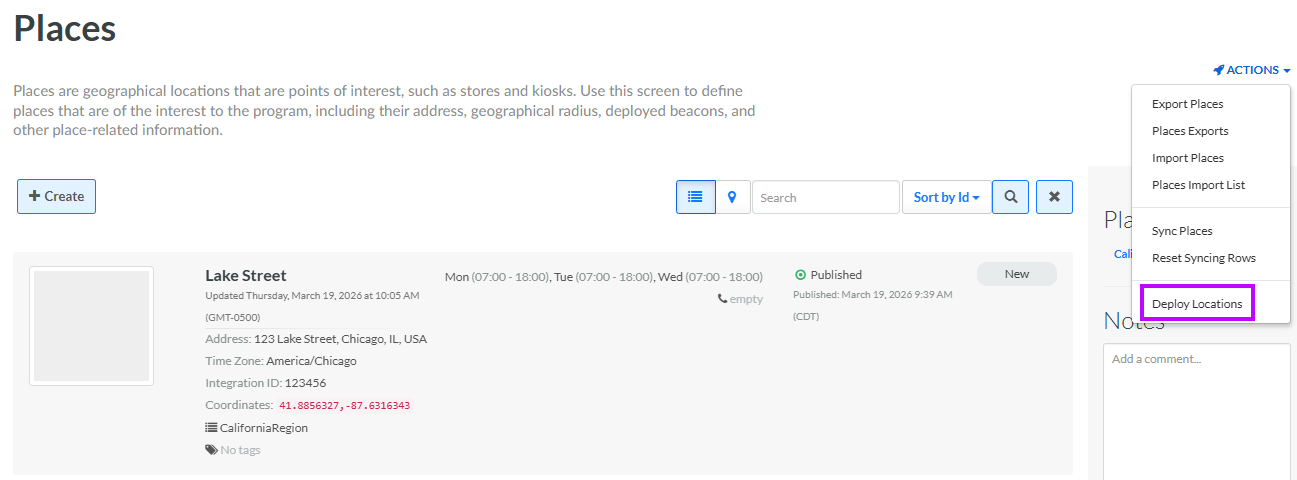
Select Admin from the top navigation bar, then select Locations > Places from the side navigation menu. The Places screen is displayed, with List View selected by default.
-
From the Actions menu in the top-right corner of the Places screen, select Deploy Locations. A success message is displayed in the bottom-right corner of the screen.